> ## Documentation Index
> Fetch the complete documentation index at: https://docs.minestorecms.com/llms.txt
> Use this file to discover all available pages before exploring further.
# Coupons
> Create and manage coupons to offer discounts to your customers.
## Introduction
**Coupons** are a great way to offer discounts to your customers. You can create coupons with a **fixed amount** or a **percentage discount**. You can also set the **minimum order amount** required to use the coupon and **limit the number of times** a coupon can be used.
## Creating a Coupon
Go to the **Discounts > Coupons** tab in the sidebar.
Click on the **"+ Create a Coupon"** button.
Fill in the coupon details like the **name**, **discount type**, **discount**, **max uses**, **redeem limit**, **minimum basket value**, **apply coupon to**, **note** and **publish/expire date**.
Click on the **"Create a Coupon"** button to create the coupon.
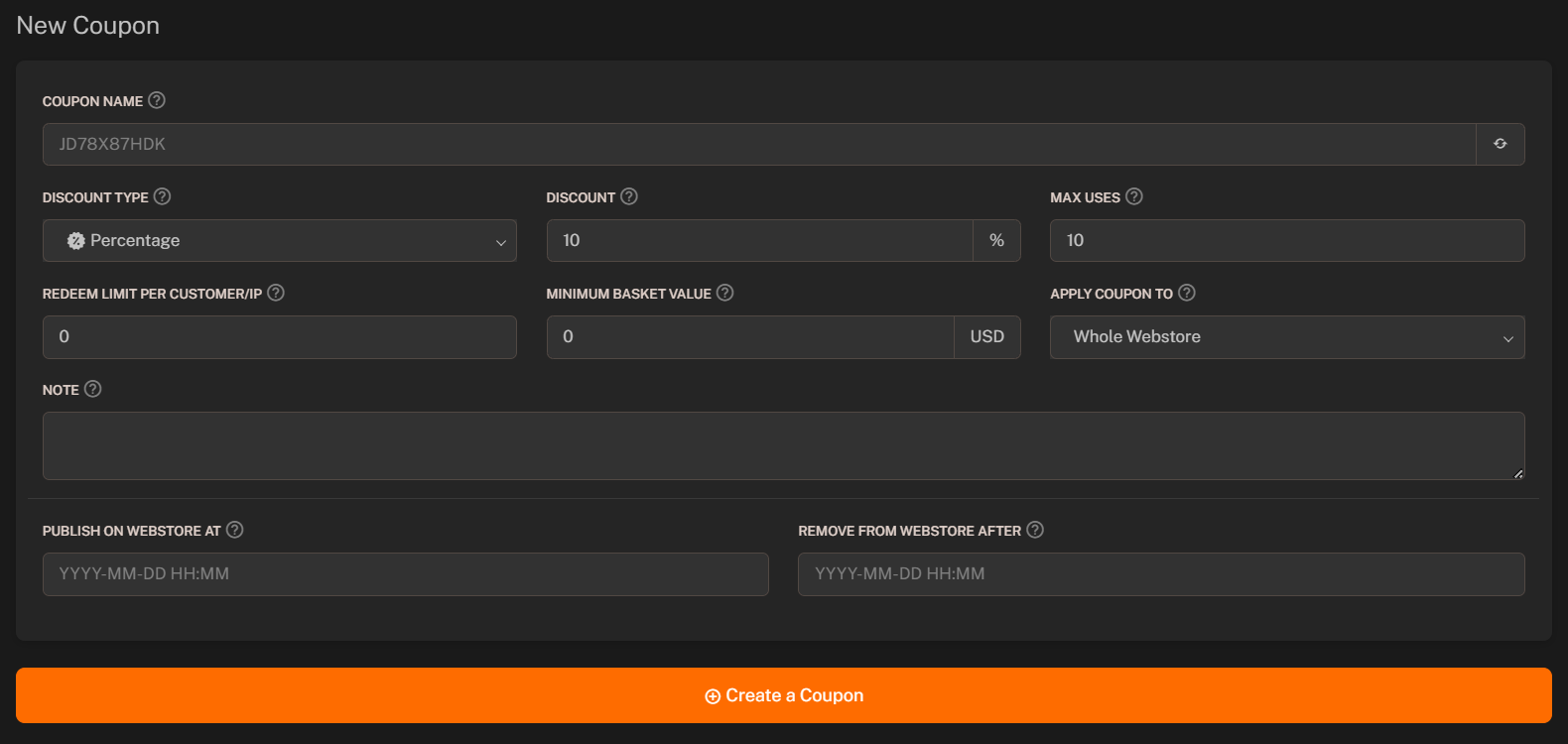 ### Discount Types
There are two types of discounts you can offer with coupons:
1. **Percentage Discount**: A percentage discount on the total order amount.
If user purchases a product worth 70 USD and you have set a 10% discount, the user will get a discount of 7 USD. Total amount to be paid by the user will be 63 USD.
2. **Fixed Amount Discount**: A fixed amount discount on the total order amount.
If user purchases a product worth 70 USD and you have set a 10 USD discount, the user will get a discount of 10 USD. Total amount to be paid by the user will be 60 USD.
### Usage Limits
You can set **Max Uses** and **Redeem Limit** for the coupon.
1. **Max Uses** is the total number of times the coupon can be used.
2. **Redeem Limit** is the number of times a single user can use the coupon.
### Minimum Basket Value
You can set the **minimum basket value** required to use the coupon. The coupon will be applied only if the **basket value is greater than or equal** to the **minimum basket value**.
**Default** value is `0`, so the coupon **can be applied to any order**.
### Apply Coupon To
You can set the **apply coupon to** field to apply the coupon to specific groups of products.
There are **three options**:
The coupon will be applied to the whole webstore.
The coupon will be applied to specific categories.
The coupon will be applied to specific packages.
### Note (Optional)
You can add a note to the coupon. The note will be displayed only to the admin and will not be visible to the customers.
### Publish/Expire Date
You can set the **publish date** and **expire date** for the coupon. The coupon will be active only between these dates.
Webstore will **automatically expire** the coupon after the **expire date** based on the **Server Time** and **MySQL Time**.
### Discount Types
There are two types of discounts you can offer with coupons:
1. **Percentage Discount**: A percentage discount on the total order amount.
If user purchases a product worth 70 USD and you have set a 10% discount, the user will get a discount of 7 USD. Total amount to be paid by the user will be 63 USD.
2. **Fixed Amount Discount**: A fixed amount discount on the total order amount.
If user purchases a product worth 70 USD and you have set a 10 USD discount, the user will get a discount of 10 USD. Total amount to be paid by the user will be 60 USD.
### Usage Limits
You can set **Max Uses** and **Redeem Limit** for the coupon.
1. **Max Uses** is the total number of times the coupon can be used.
2. **Redeem Limit** is the number of times a single user can use the coupon.
### Minimum Basket Value
You can set the **minimum basket value** required to use the coupon. The coupon will be applied only if the **basket value is greater than or equal** to the **minimum basket value**.
**Default** value is `0`, so the coupon **can be applied to any order**.
### Apply Coupon To
You can set the **apply coupon to** field to apply the coupon to specific groups of products.
There are **three options**:
The coupon will be applied to the whole webstore.
The coupon will be applied to specific categories.
The coupon will be applied to specific packages.
### Note (Optional)
You can add a note to the coupon. The note will be displayed only to the admin and will not be visible to the customers.
### Publish/Expire Date
You can set the **publish date** and **expire date** for the coupon. The coupon will be active only between these dates.
Webstore will **automatically expire** the coupon after the **expire date** based on the **Server Time** and **MySQL Time**.