> ## Documentation Index
> Fetch the complete documentation index at: https://docs.minestorecms.com/llms.txt
> Use this file to discover all available pages before exploring further.
# Chargebacks
> Learn how to manage chargebacks and increase your chances of winning disputes.
## **Introduction**
**Chargebacks** are a common issue for **Minecraft webstores**. A chargeback occurs when a customer disputes a transaction with their bank or credit card company. Chargebacks can be **costly for businesses**, as they result in lost revenue and **additional fees**.
**MineStoreCMS** provides tools to help you manage chargebacks and increase your chances of winning disputes. You can view and manage chargebacks in the **Chargebacks** section of the **Admin Panel**.
There, you can view detailed information about each chargeback, including the **transaction ID, amount, status, and reason**.
**MineStoreCMS** does not handle chargebacks instead of you. We provide tools to help you manage chargebacks and increase your chances of winning disputes.
Our **tools** and **advices** helped **server owners** to win **90%** of disputes and **prevent** over 3000 potentially fraudulent transactions.
## Chargebacks
### Chargebacks List
The **Chargebacks** list displays all chargebacks made on your webstore. You can access the **Chargeback List** by navigating to the **Fraud > Chargeback List** tab in the **Admin Panel**.
**Chargebacks** handling available only for **PayPal IPN**, **Stripe**, and **Skrill** payment gateways.
### **Chargeback Details**
You can select a chargeback from the **Chargebacks** list to view detailed information about the chargeback. The **Chargeback Details** provide information that can help you understand the reason for the chargeback and take appropriate action.
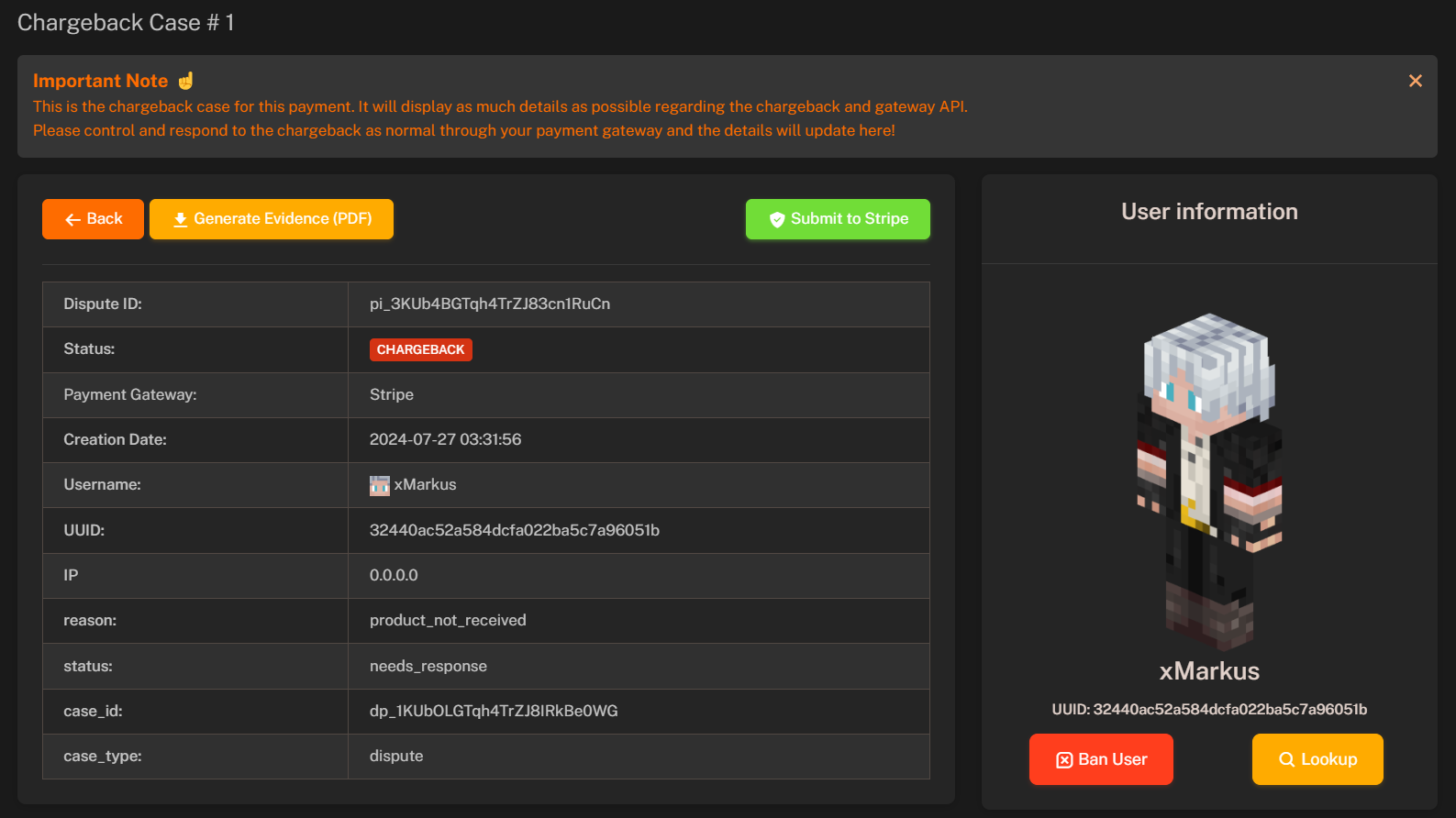 Following information is available in the **Chargeback Details**:
* **Dispute ID**: Unique identifier for the chargeback dispute.
* **Status**: Current status of the chargeback (e.g., **Chargeback**, **Closed**, **Won**, **Lost**).
* **Payment Gateway**: Payment gateway used for the transaction (e.g., **PayPal IPN**, **Stripe** or **Skrill**).
* **Creation Date**: Date and time when the chargeback was created.
* **Username**: Username of the buyer.
* **UUID**: Unique identifier for the buyer.
* **IP Address**: IP address of the buyer.
* **Reason**: Reason provided by the buyer for the chargeback.
* **Chargeback Status**: Current status of the chargeback (e.g., `needs_response`, `won`, `lost`).
* **Case ID**: Unique identifier for the chargeback case.
* **Case Type**: Type of the chargeback case (e.g., `dispute`, `chargeback`).
### **Generating Evidence**
To increase your chances of winning a chargeback dispute, you need to provide **evidence** to support your case.
**MineStoreCMS** automatically collecting all data and building you a PDF file that includes and confirms intentions of user complete purchase.
You can generate evidence by clicking on the **Generate Evidence** button in the **Chargeback Details**. The evidence will be generated as a PDF file that you can submit to the payment gateway to support your case.
We won't mention what we include in the PDF file here, but you can check it by yourself :)
**Evidence** is generated automatically by **MineStoreCMS** and includes all necessary information to support your case. However, we recommend reviewing the evidence before submitting it to the payment gateway and explaining the situation in your own words.
### How I can increase my chances of winning a dispute?
1. **Provide Evidence**: Make sure to provide evidence to support your case. **MineStoreCMS** automatically generates evidence for you, but we also **recommend adding additional information** to support your case.
2. **Attach Screenshots**: If you have any additional information or screenshots (i.e. `Commands History`) that can help support your case, make sure to attach them to the evidence.
3. **Explain the Situation**: Provide a detailed explanation of the situation and why you believe the chargeback is invalid. Be sure to include any relevant information that can help support your case.
4. **Authorize Clients**: If you have In-Game Authorization enabled, make sure to mention that in your response to the chargeback dispute. This can help demonstrate that the buyer authorized the transaction.
Learn more about **Commands History** to operate with chargebacks and use it in disputes.
Learn how to enable **In-Game Authorization** to prevent chargebacks and authorize clients.
Following information is available in the **Chargeback Details**:
* **Dispute ID**: Unique identifier for the chargeback dispute.
* **Status**: Current status of the chargeback (e.g., **Chargeback**, **Closed**, **Won**, **Lost**).
* **Payment Gateway**: Payment gateway used for the transaction (e.g., **PayPal IPN**, **Stripe** or **Skrill**).
* **Creation Date**: Date and time when the chargeback was created.
* **Username**: Username of the buyer.
* **UUID**: Unique identifier for the buyer.
* **IP Address**: IP address of the buyer.
* **Reason**: Reason provided by the buyer for the chargeback.
* **Chargeback Status**: Current status of the chargeback (e.g., `needs_response`, `won`, `lost`).
* **Case ID**: Unique identifier for the chargeback case.
* **Case Type**: Type of the chargeback case (e.g., `dispute`, `chargeback`).
### **Generating Evidence**
To increase your chances of winning a chargeback dispute, you need to provide **evidence** to support your case.
**MineStoreCMS** automatically collecting all data and building you a PDF file that includes and confirms intentions of user complete purchase.
You can generate evidence by clicking on the **Generate Evidence** button in the **Chargeback Details**. The evidence will be generated as a PDF file that you can submit to the payment gateway to support your case.
We won't mention what we include in the PDF file here, but you can check it by yourself :)
**Evidence** is generated automatically by **MineStoreCMS** and includes all necessary information to support your case. However, we recommend reviewing the evidence before submitting it to the payment gateway and explaining the situation in your own words.
### How I can increase my chances of winning a dispute?
1. **Provide Evidence**: Make sure to provide evidence to support your case. **MineStoreCMS** automatically generates evidence for you, but we also **recommend adding additional information** to support your case.
2. **Attach Screenshots**: If you have any additional information or screenshots (i.e. `Commands History`) that can help support your case, make sure to attach them to the evidence.
3. **Explain the Situation**: Provide a detailed explanation of the situation and why you believe the chargeback is invalid. Be sure to include any relevant information that can help support your case.
4. **Authorize Clients**: If you have In-Game Authorization enabled, make sure to mention that in your response to the chargeback dispute. This can help demonstrate that the buyer authorized the transaction.
Learn more about **Commands History** to operate with chargebacks and use it in disputes.
Learn how to enable **In-Game Authorization** to prevent chargebacks and authorize clients.