> ## Documentation Index
> Fetch the complete documentation index at: https://docs.minestorecms.com/llms.txt
> Use this file to discover all available pages before exploring further.
# Migration Tools
> Easily migrate from other platforms to MineStoreCMS with the new migration tools. This feature allows you to import your packages, categories, and packages.
## Introduction
This is a **new feature** that was added in **MineStoreCMS v3.5.0**.
The **Migration Tools** allows you to easily migrate from other platforms to **MineStoreCMS**. This feature allows you to import your packages, categories, and packages from other platforms like **Tebex**.
**MineStoreCMS** supports the **Migration Tools** since version **v3.5.0**.
## Migrating from Tebex
1. First, find the **Migration Tools** tab in your **Admin Panel** sidebar.
2. Click on the **Migration Tools** tab.
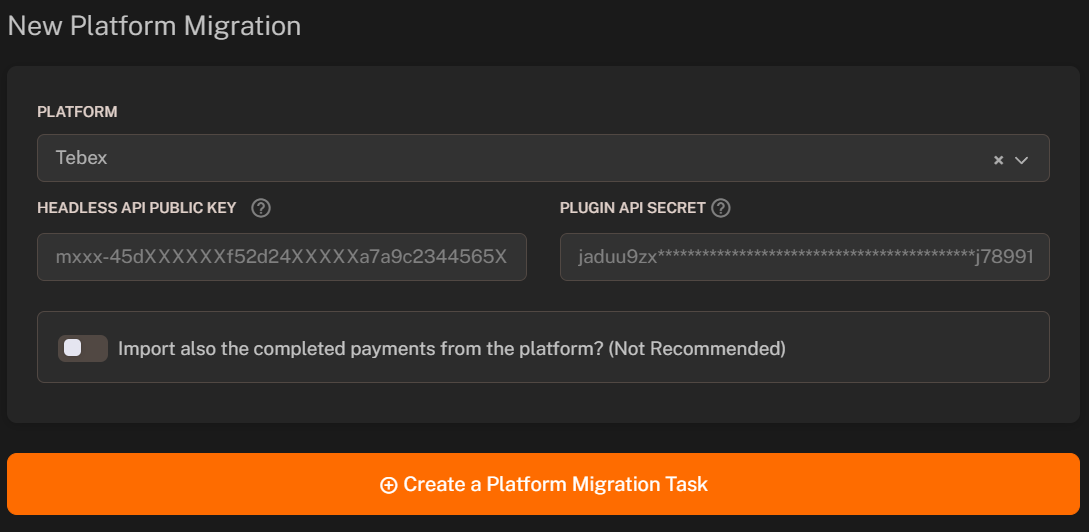 To start a new platform migration from **Tebex**, follow these steps:
1. Select the **Tebex** platform from the dropdown menu.
2. Fill [Headless API Public Key](https://creator.tebex.io/developers/api-keys) and put it in the **"Headless API Public Key"** field.
3. Find the **Plugin API Secret Key** in your **Tebex Game Plugin** settings and put it in the **"Plugin API Secret Key"** field.
4. Select if you want to import **completed payments** from **Tebex** (Not Recommended).
**Note**: It could take up to **1 minute** to migrate the data from **Tebex** since it needs to cache new **settings data**.
To start a new platform migration from **Tebex**, follow these steps:
1. Select the **Tebex** platform from the dropdown menu.
2. Fill [Headless API Public Key](https://creator.tebex.io/developers/api-keys) and put it in the **"Headless API Public Key"** field.
3. Find the **Plugin API Secret Key** in your **Tebex Game Plugin** settings and put it in the **"Plugin API Secret Key"** field.
4. Select if you want to import **completed payments** from **Tebex** (Not Recommended).
**Note**: It could take up to **1 minute** to migrate the data from **Tebex** since it needs to cache new **settings data**.