> ## Documentation Index
> Fetch the complete documentation index at: https://docs.minestorecms.com/llms.txt
> Use this file to discover all available pages before exploring further.
# Package's Commands
> This article explains how to add commands to the package that will be executed when the package is purchased or any other event happened.
## **Commands**
**Commands** are a powerful feature that allows you to **execute actions** on the server when the package is purchased or any other event happened. You can add multiple commands to the package that will be executed in the order they are added on multiple or specified **Game server**.
## **Adding Commands**
To add commands to the package, follow the steps below:
Navigate to the **Admin Panel**.
Click on the **Packages** tab to access the package management area.
Select the package you want to add commands to.
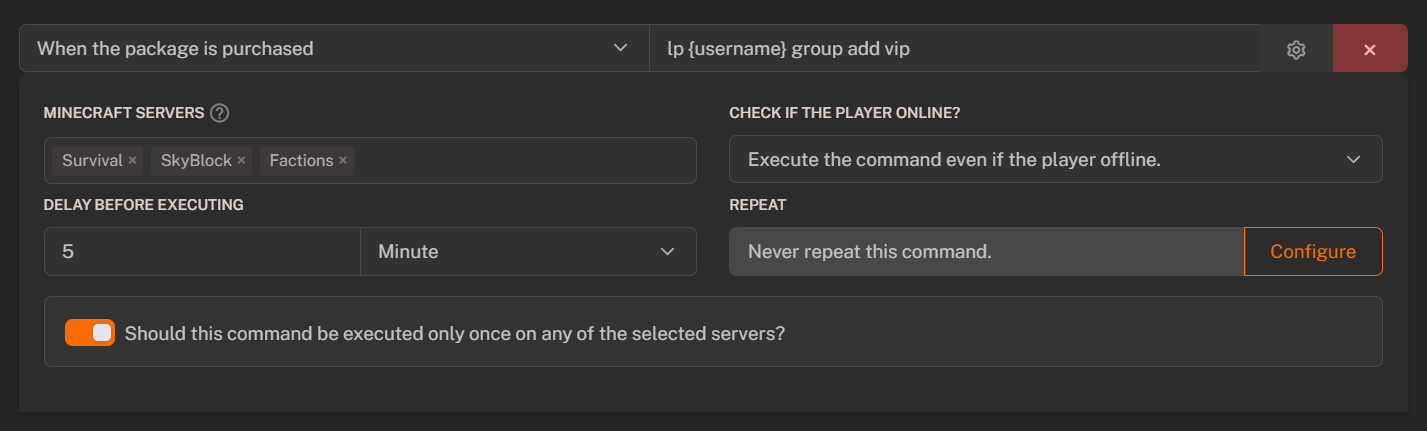
Scroll down to the **Commands** section and press the **+ Add Command** button.
Select the **Minecraft servers** where the commands could be executed or need to be displayed in the **"Commands List"**.
Fill in the **command details**:
* **Event**: Select the event when the command will be executed.
* **Command**: Enter the command that will be executed. Make sure you **did not** put slash trail `/`.
* **Minecraft Servers**: Select the Minecraft servers where the command will be executed.
* **Check if the player online?"**: Enable this option to check if the player is online before executing the command.
* **Delay before executing**: Set the delay before executing the command (optional, by default `empty`).
* **Repeat Cycle**: Set the repeat cycle for the command (optional, by default `disabled`).
* **Should this command be executed only once on any of the selected servers?**: Enable this option to execute the command only once on any of the selected servers. This feature might be usable for big networks.
Press the **+ Add Command** button to add more commands to the package.
Press the **Save** button to save the package with the added commands.
 ## **Command Events**
**Command events** are the actions that **trigger** the command execution. You can specify the command to be executed when the **event happens**.
Triggers when the customer purchases the package.
Triggers when the customer chargebacks the payment for the package or makes a dispute.
Triggers when the package is removed from the customer. It will be removed based on the package settings or if the subscription failed.
Triggers when the subscription package renews. The command will be executed when the next recurring payment is made.
## **Command Variables**
**Command variables** are the placeholders that can be used in the commands. Variables can be used to **personalize the commands** for each customer. You can **select attached variables from the dropdown list** and use them in the commands.
| **Variable** | **Meaning of the Variable / Replaces With** |
| ---------------- | ------------------------------------------- |
| `{username}` | User nickname |
| `{package_name}` | Package name |
| `{price}` | Package price |
| `{currency}` | Currency |
| `{coupon}` | Used coupon |
| `{uuid}` | UUID (Universally Unique Identifier) |
| `{time}` | Command execution time |
| `{date}` | Command execution date |
| `{customerIP}` | Customer IP |
| `{server}` | Server name |
## **Command Events**
**Command events** are the actions that **trigger** the command execution. You can specify the command to be executed when the **event happens**.
Triggers when the customer purchases the package.
Triggers when the customer chargebacks the payment for the package or makes a dispute.
Triggers when the package is removed from the customer. It will be removed based on the package settings or if the subscription failed.
Triggers when the subscription package renews. The command will be executed when the next recurring payment is made.
## **Command Variables**
**Command variables** are the placeholders that can be used in the commands. Variables can be used to **personalize the commands** for each customer. You can **select attached variables from the dropdown list** and use them in the commands.
| **Variable** | **Meaning of the Variable / Replaces With** |
| ---------------- | ------------------------------------------- |
| `{username}` | User nickname |
| `{package_name}` | Package name |
| `{price}` | Package price |
| `{currency}` | Currency |
| `{coupon}` | Used coupon |
| `{uuid}` | UUID (Universally Unique Identifier) |
| `{time}` | Command execution time |
| `{date}` | Command execution date |
| `{customerIP}` | Customer IP |
| `{server}` | Server name |