> ## Documentation Index
> Fetch the complete documentation index at: https://docs.minestorecms.com/llms.txt
> Use this file to discover all available pages before exploring further.
# Discord Roles
> Learn how to attach Discord roles to packages.
## Introduction
The **Discord Roles** module allows you to attach Discord roles to **packages** on your webstore. So when a **user purchases a package**, they will **automatically** receive the corresponding **Discord role** on your **Discord server**. This feature is useful for managing permissions and providing exclusive benefits to your customers based on their purchases.
The **Discord Roles** module requires the **Discord Bot** feature to be enabled in the **Discord Settings** section. Make sure you have set up the **Discord Bot** before configuring **Discord roles** for **packages**.
Learn how to set up the Discord Bot to sync roles and permissions with your webstore.
## How to Attach Discord Roles to Packages?
To attach **Discord roles** to **packages**, follow the steps below:
Log in to your **Admin Panel**.
Go to the **Packages** section in the sidebar menu.
Edit the **package** to which you want to attach a **Discord role**.
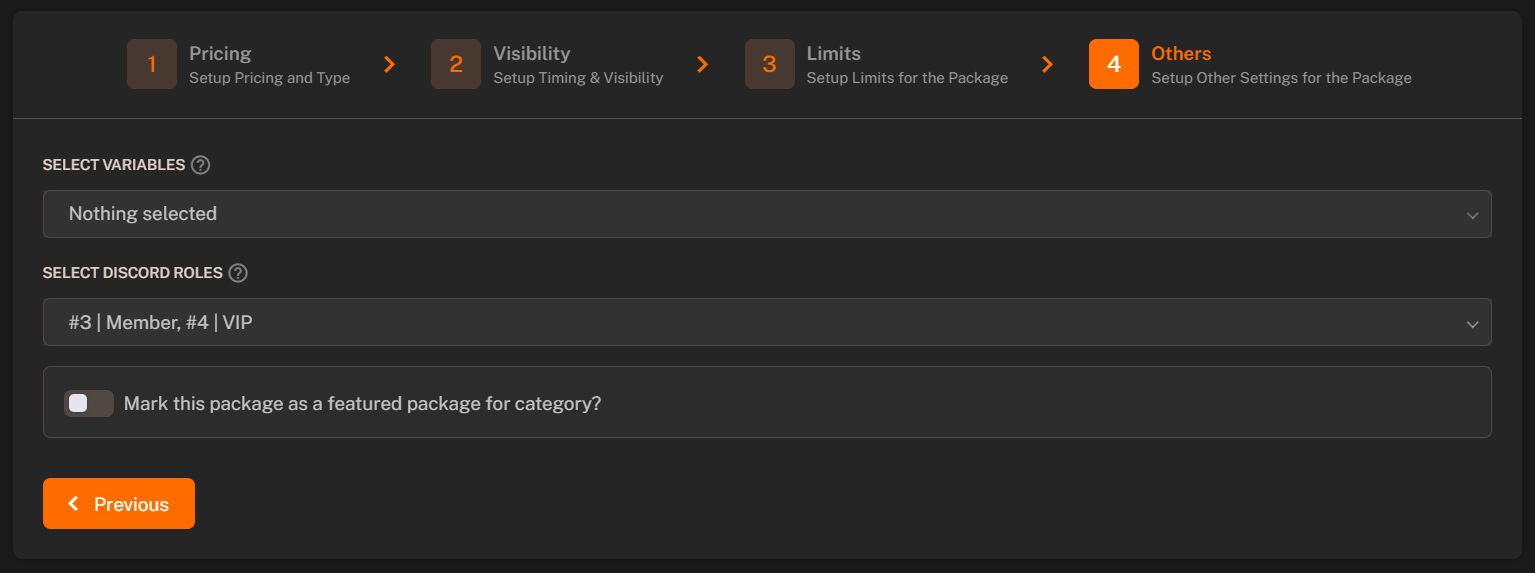
Select the **Others** tab in the package settings.
Select the **Discord roles** that you want to attach to the **package**. Before that make sure you have enabled the **Discord Bot** feature in the **Discord Settings** section.
Attach exactly one command to the package, you can make a callback "fake" server, so this command will never be executed, if you don't want it. Also, make a chargeback command, so role will be taken away from the user if he will chargeback.
Press **Save** to apply the changes.
You can attach **multiple Discord roles** to a single package. This allows you to assign multiple roles to users based on their purchases.
 Attach exactly one command to the package, you can make a callback "fake" server, so this command will never be executed, if you don't want it. Also, make a chargeback command, so role will be taken away from the user if he will chargeback.