> ## Documentation Index
> Fetch the complete documentation index at: https://docs.minestorecms.com/llms.txt
> Use this file to discover all available pages before exploring further.
# Packages
> Packages are the products that you can sell on your webstore. They can be digital products like ranks, items, or permissions. You can also sell gift cards at your webstore. To have a better understanding of packages, you can refer to the documentation below.
## **What are Packages?**
Packages are the products that you can sell on your webstore. They can be digital products like ranks, items, or permissions. You can also sell gift cards at your webstore. Each package can have a different price, duration, features and other settings. You can create packages for executing commands, giving permissions, or sending items to players in-game.
## **Creating Package**
Navigate to the **Admin Panel**.
Click on the **Packages** tab to access the package management area.
Press the **+ Add New** button and select **Package** from the dropdown menu.
Fill in the **package details**:
* **Name**: Enter the name of the package.
* **Description**: Add a description of the package (optional).
* **Image**: Upload an image for the package (optional).
* **Category**: Select the category for the package.
* **Package Type**: Minecraft Package (command execution) or Gift Card.
* **Price**: Enter the price of the package.
* **Discount**: Specify the discount amount for the package (optional).
* **Remove Package From Customer After**: Period of time after which the package will be removed from the customer (`Removed commands` will be executed).
* **Commands**: Add commands that will be executed when the package is purchased.
### **Package Visibility**
You can control the visibility of the package on the webstore by setting the following options:
* **Publish on Webstore At**: Set the date and time when the package will be available on the webstore.
* **Remove from Webstore At**: Set the date and time when the package will be removed from the webstore.
* **"Enable this package and make it visible?"**: Enable or disable the package visibility on the webstore.
You don't need to setup publish and remove dates if you want the package to be available on the webstore immediately.
### **Package Limits**
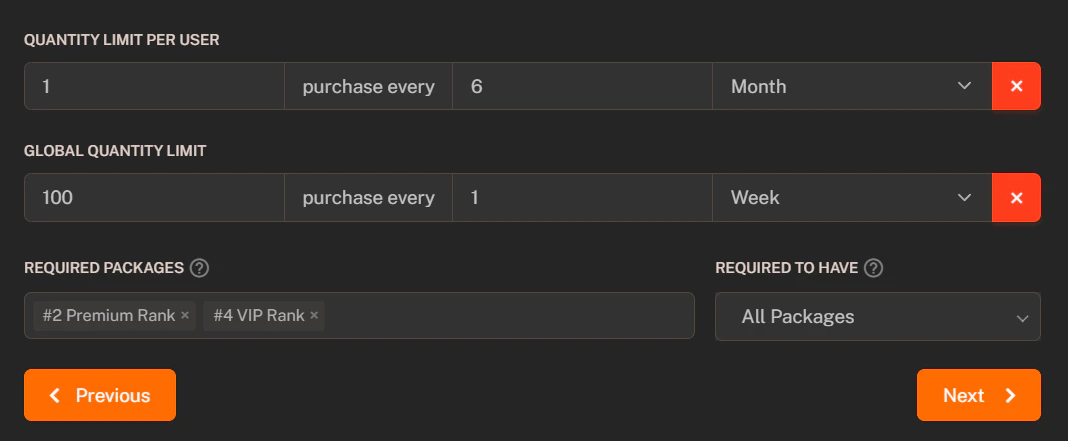
You can limit the purchase of the package by setting the following options:
1. **Quantity Limit Per User**: Set the maximum number of times a user can purchase the package.
2. **Global Quantity Limit**: Set the maximum number of times the package can be purchased globally (stocking).
3. **Required Packages**: Set the packages that must be purchased before this package can be purchased.
4. **Required To Have**: "All" or "One" of the required packages must be purchased before this package can be purchased.
 ### **Package Variables**
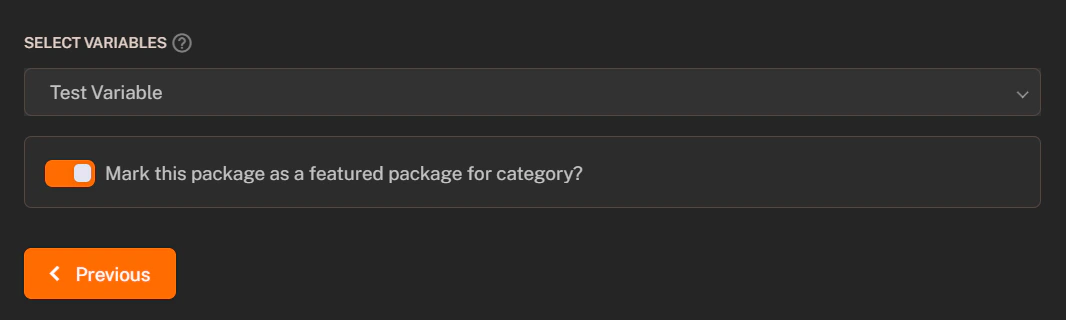
It is possible to **attach variables** to the package that can be used in the commands. Variables can be used to personalize the commands for each customer. You can **select attached variables from the dropdown list** and use them in the commands.
The customer will be asked to fill in the variables when purchasing the package. The variables will be replaced with the customer's input in the commands.
### **Featured Package**
You can mark a package as a featured package to highlight it on the webstore. Featured packages are **highlighted** and **more visible** to customers.
### **Package Variables**
It is possible to **attach variables** to the package that can be used in the commands. Variables can be used to personalize the commands for each customer. You can **select attached variables from the dropdown list** and use them in the commands.
The customer will be asked to fill in the variables when purchasing the package. The variables will be replaced with the customer's input in the commands.
### **Featured Package**
You can mark a package as a featured package to highlight it on the webstore. Featured packages are **highlighted** and **more visible** to customers.