> ## Documentation Index
> Fetch the complete documentation index at: https://docs.minestorecms.com/llms.txt
> Use this file to discover all available pages before exploring further.
# Terminal3 (Paymentwall)
> Accept multiple worldwide and local payment methods with Terminal3. This payment method is perfect for Asian countries.
## How to connect Terminal3 to Webstore?
### Step 1: Get your Terminal3 API key
1. Go to [Terminal3](https://terminal3.com/) and sign in.
2. Create the **Project** and get the `Project ID` and `Project Secret`.
3. Select for **API Mode** - `Checkout API`.
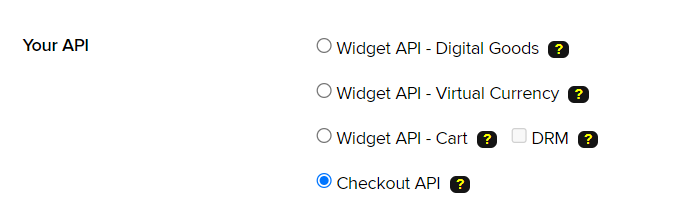 4. Copy the `Project ID` and `Project Secret` and keep it safe.
5. Configure the **Webhook URL** from your webstore dashboard (i.e. `https://v3.minestorecms.com/api/payments/handle/terminal3`).
### Step 2: Enable Terminal3 to your webstore
1. Go to your **webstore dashboard**.
2. Click on `Settings > Payment Gateways`.
3. Scroll down to `Terminal3` and enable it.
4. Enter your `Project ID`.
5. Enter your `Project Secret`.
6. Press **Save** button.
This payment gateway has a lot of regional payment methods that are perfect for Asian countries.
4. Copy the `Project ID` and `Project Secret` and keep it safe.
5. Configure the **Webhook URL** from your webstore dashboard (i.e. `https://v3.minestorecms.com/api/payments/handle/terminal3`).
### Step 2: Enable Terminal3 to your webstore
1. Go to your **webstore dashboard**.
2. Click on `Settings > Payment Gateways`.
3. Scroll down to `Terminal3` and enable it.
4. Enter your `Project ID`.
5. Enter your `Project Secret`.
6. Press **Save** button.
This payment gateway has a lot of regional payment methods that are perfect for Asian countries.