> ## Documentation Index
> Fetch the complete documentation index at: https://docs.minestorecms.com/llms.txt
> Use this file to discover all available pages before exploring further.
# Player Referrals
> Track and manage player referrals to your webstore.
## **Introduction**
The **Player Referral** feature allows customers to specify who **referred** them to your webstore, enabling you to **track** the number of **referrals** made by each **referrer**. This feature can be configured for **statistical purposes only**—ideal for tracking **media promotions**—or to **execute specific commands** for every purchase made through a **referral**.
**Player Referrals** can be used to **track** the number of **referrals** made by each **referrer**.
## **Enabling Player Referrals Module**
To enable the **Player Referrals** module, follow the steps below:
Click on the **Admin Panel**.
Click on the **Player Referrals** tab to access the player referral management area.
Toggle the **Player Referrals** switch to enable the module on the top of the page.
 ## Configuring Player Referrals
### Create a Referral Code
To create a **referral code**, follow the steps below:
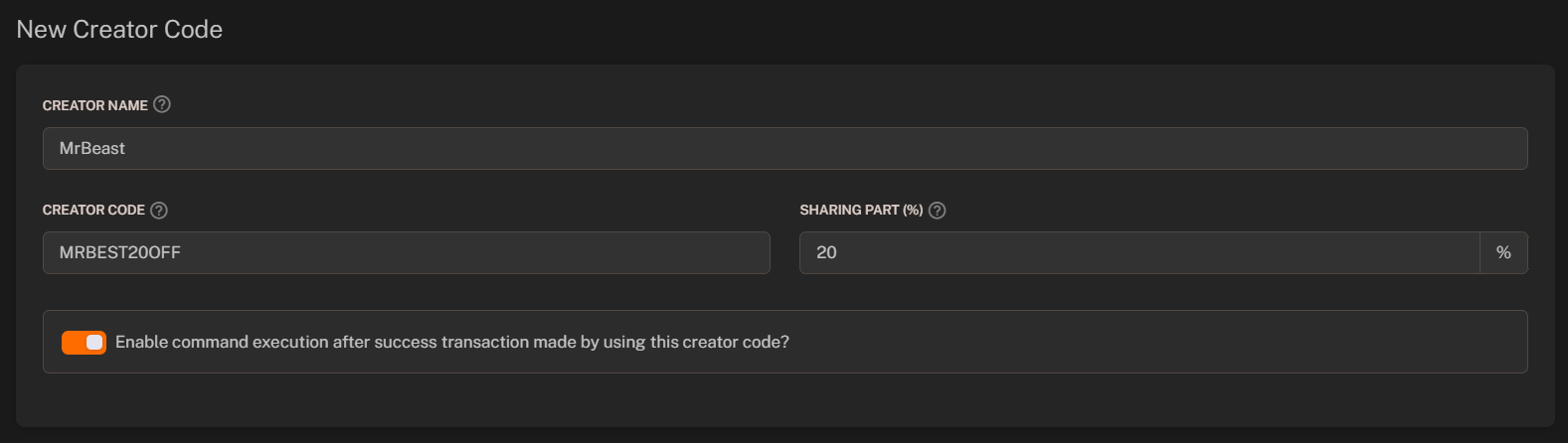
1. Press the **"+ Add Referrer"** button.
2. Fill in the **required fields**:
* **Creator Name**: Enter the name of the referrer to display on admin dashboard (i.e. `MrBeast`).
* **Creator Code**: Enter the identifier that users enter during checkout (i.e. `BEAST`).
* **Sharing Part**: Set the percentage of the purchase that will be displayed as a reward for the referrer (only for statistical purposes).
3. Press the **"+ Create the Referral Code"** button.
## Configuring Player Referrals
### Create a Referral Code
To create a **referral code**, follow the steps below:
1. Press the **"+ Add Referrer"** button.
2. Fill in the **required fields**:
* **Creator Name**: Enter the name of the referrer to display on admin dashboard (i.e. `MrBeast`).
* **Creator Code**: Enter the identifier that users enter during checkout (i.e. `BEAST`).
* **Sharing Part**: Set the percentage of the purchase that will be displayed as a reward for the referrer (only for statistical purposes).
3. Press the **"+ Create the Referral Code"** button.
 ### Assign Commands to Referral Codes
You can assign **commands** to **referral codes** to execute specific actions when a purchase is made through a **referral**. To assign a command, follow the steps below:
1. Enable the **"Enable command execution after success transaction made by using this creator code?"** toggle.
2. Scroll down to the **"Minecraft Server Commands"** section.
3. Press the **"+ Add Command"** button.
4. Configure **commands** to be executed when a purchase is made through the **referral code**.
Learn more about configuring commands for webstore.
#### Available Variables
You can use the following variables in the **command** field:
| **Variable** | **Meaning of the variable** | **Replaces with** |
| ----------------- | --------------------------- | ----------------------- |
| `{inviter}` | Inviter nickname | Inviter's nickname |
| `{inviter_uuid}` | Inviter UUID | Inviter's UUID |
| `{inviterIP}` | Inviter IP address | Inviter's IP address |
| `{referral}` | Referral username | Referral's username |
| `{referral_uuid}` | Referral UUID | Referral's UUID |
| `{referralIP}` | Referral IP address | Referral's IP address |
| `{time}` | Command execution time | Execution time |
| `{date}` | Command execution date | Execution date |
| `{currency}` | Currency | Currency name or symbol |
### Assign Commands to Referral Codes
You can assign **commands** to **referral codes** to execute specific actions when a purchase is made through a **referral**. To assign a command, follow the steps below:
1. Enable the **"Enable command execution after success transaction made by using this creator code?"** toggle.
2. Scroll down to the **"Minecraft Server Commands"** section.
3. Press the **"+ Add Command"** button.
4. Configure **commands** to be executed when a purchase is made through the **referral code**.
Learn more about configuring commands for webstore.
#### Available Variables
You can use the following variables in the **command** field:
| **Variable** | **Meaning of the variable** | **Replaces with** |
| ----------------- | --------------------------- | ----------------------- |
| `{inviter}` | Inviter nickname | Inviter's nickname |
| `{inviter_uuid}` | Inviter UUID | Inviter's UUID |
| `{inviterIP}` | Inviter IP address | Inviter's IP address |
| `{referral}` | Referral username | Referral's username |
| `{referral_uuid}` | Referral UUID | Referral's UUID |
| `{referralIP}` | Referral IP address | Referral's IP address |
| `{time}` | Command execution time | Execution time |
| `{date}` | Command execution date | Execution date |
| `{currency}` | Currency | Currency name or symbol |