> ## Documentation Index
> Fetch the complete documentation index at: https://docs.minestorecms.com/llms.txt
> Use this file to discover all available pages before exploring further.
# Collecting Data
> Learn how to enable the Collecting Data module to collect additional information during checkout.
## **Introduction**
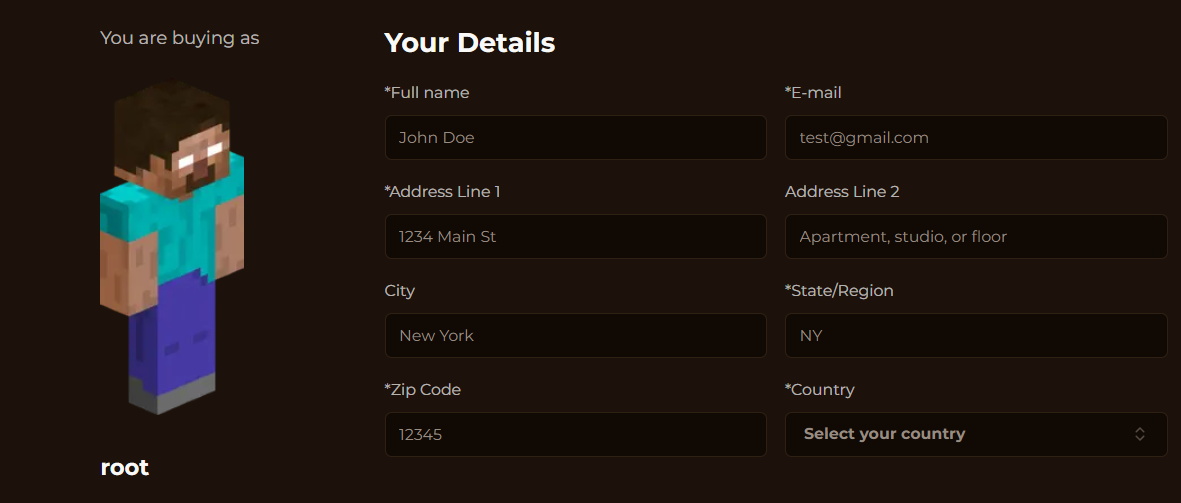
The **Collecting Data** module allows you to collect additional information from customers during the checkout process. You can enable this module to **collect data** such as the **email address**, **full name**, and **billing address** of the buyer. This information is useful to prevent chargeback and **authorize clients**.
That's how it looks during the **checkout process**:
 ## **Enabling Collecting Data**
To enable the **Collecting Data** module, follow the steps below:
Click on the **Admin Panel**.
Click on the **Transactions** tab to access the transaction management area.
Toggle the **Enable Collecting Client's Data** switch to enable the module.
## **Enabling Collecting Data**
To enable the **Collecting Data** module, follow the steps below:
Click on the **Admin Panel**.
Click on the **Transactions** tab to access the transaction management area.
Toggle the **Enable Collecting Client's Data** switch to enable the module.
 **Personal Data** you collect during the checkout process only available for your and for your store. **We do not store any data.** So, you are responsible for the data you collect.