> ## Documentation Index
> Fetch the complete documentation index at: https://docs.minestorecms.com/llms.txt
> Use this file to discover all available pages before exploring further.
# Overview
> Learn about the key features of the Transactions module.
## **Introduction**
**Transactions** is a core module that allows you to manage all transactions made on your webstore. You can view detailed information about each transaction, including the **information of the buyer**, **payment method**, **transaction status**, **commands history**, and more.
**Transactions** module allows you to **view detailed information** about each transaction made on your webstore.
## Transactions Overview
### Transactions List
The **Transactions** list displays all transactions made on your webstore. You can access the **Transactions** list by navigating to the **Transactions** tab in the **Admin Panel**.
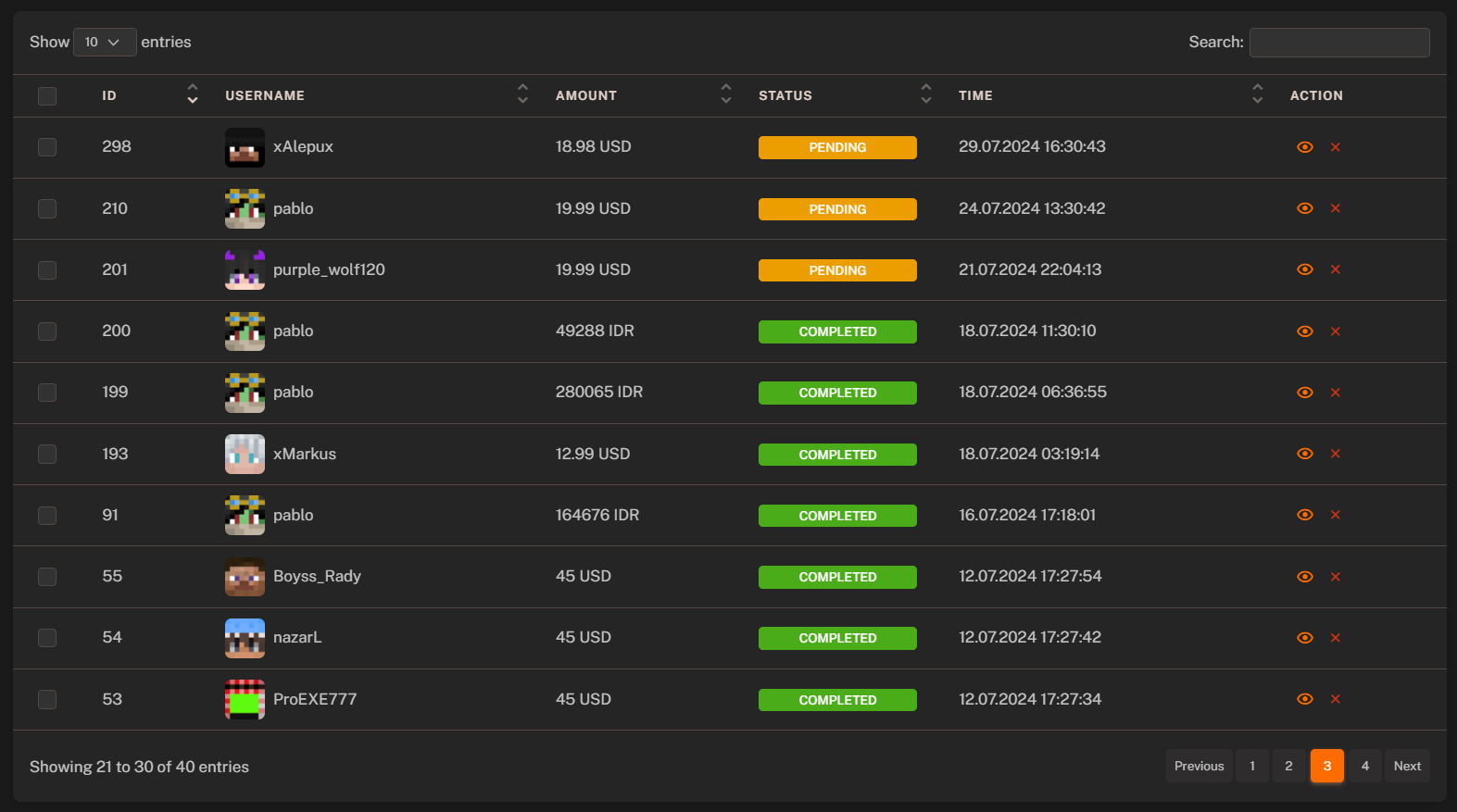 All **"Pending"** payments getting **automatically removed** after **short period** of time. If you want to keep them, you can change the status to **"Completed"**.
### Transaction Details
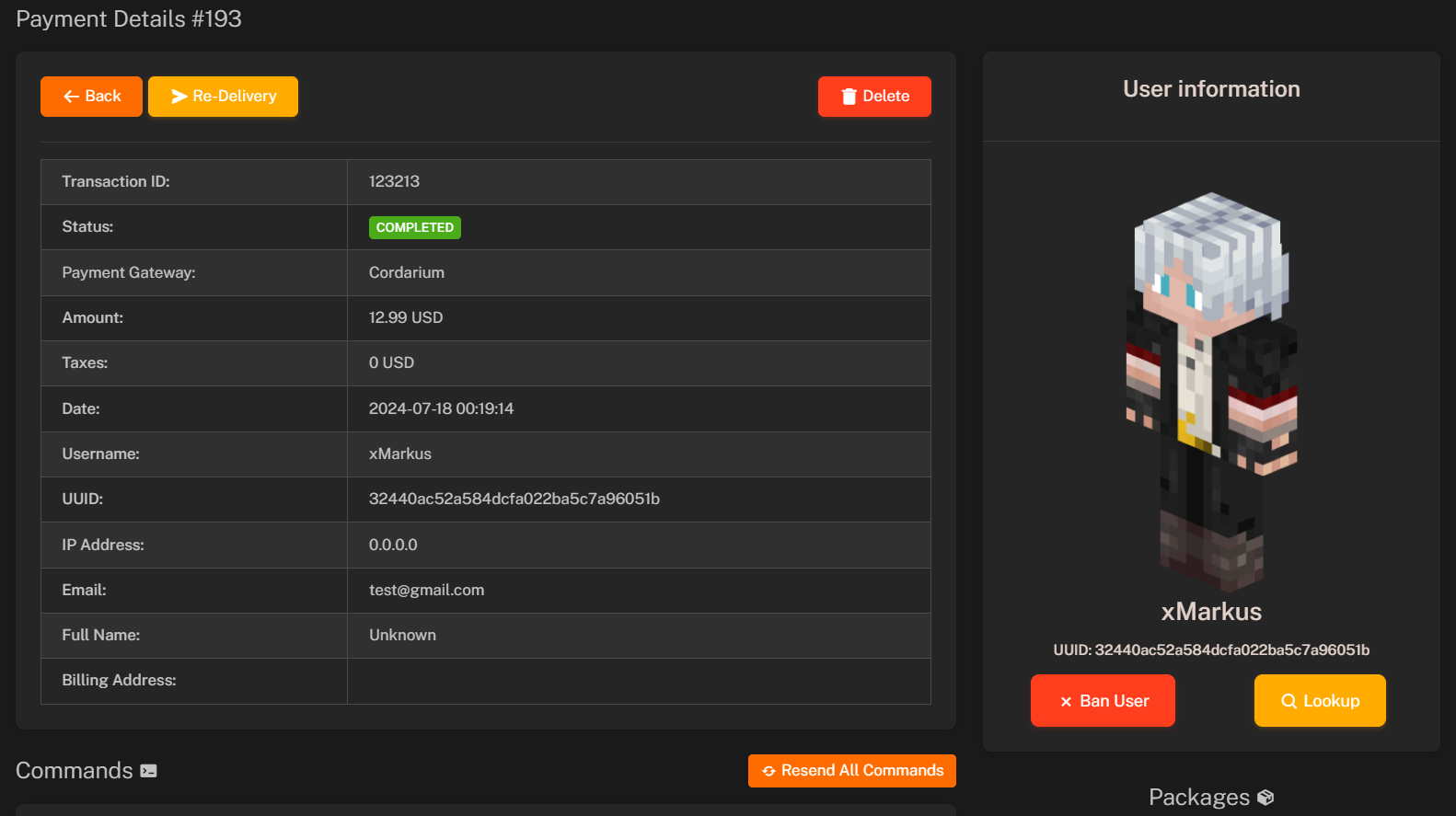
You can view detailed information about each transaction by clicking on the transaction in the **Transactions** list. The transaction details page provides information about the buyer, payment gateway, transaction status, payment amount, and more.
All **"Pending"** payments getting **automatically removed** after **short period** of time. If you want to keep them, you can change the status to **"Completed"**.
### Transaction Details
You can view detailed information about each transaction by clicking on the transaction in the **Transactions** list. The transaction details page provides information about the buyer, payment gateway, transaction status, payment amount, and more.
 #### **Buyer Information**
* **Transaction ID**: Unique identifier for the transaction.
* **Transaction Status**: Current status of the transaction (e.g., **Pending**, **Completed**, **Error**, **Chargeback**).
* **Payment Gateway**: Payment gateway used for the transaction (e.g., **PayPal**, **Stripe**, **Coinbase**, **MercadoPago** etc.).
* **Transaction Amount (Price)**: Total amount paid by the buyer.
* **Taxes**: Taxes applied to the transaction (if any are set up).
* **Date**: Date and time when the transaction was made.
* **Username**: Username of the buyer.
* **UUID**: Unique identifier for the buyer.
* **IP Address**: IP address of the buyer.
* **Email**: Email address of the buyer.
* **Full Name**: Full name of the buyer.
* **Billing Address**: Billing address of the buyer.
**Email**, **Full Name**, and **Billing Address** are only available if you have the **"Collecting Data"** module enabled.
Learn how to enable the **Collecting Data** module to collect additional information during checkout.
#### **Commands History**
The **Commands History** section displays all commands executed for the transaction. You can view the command name, status, and execution date.
Learn more about the **Commands History** and how to view executed commands for transactions.
#### **Referrals**
The **Referrals** section displays information about the referral code used for the transaction. You can view the referrer's name, code, and reward percentage.
Learn more about the **Referral System** and how to set up referral codes for your webstore.
#### **Packages**
The **Packages** section displays information about the package purchased in the transaction. You can view the package name, price, quantity, and total amount.
#### **Applied Coupons**
The **Applied Coupons** section displays information about the coupons applied to the transaction. You can view the coupon code, discount amount, and total amount after the discount.
#### **Used Gift Cards**
The **Used Gift Cards** section displays information about the gift cards used for the transaction. You can view the gift card code, amount, and total amount after the gift card discount.
#### **Notes**
The **Notes** section allows you to add notes to the transaction. You can add notes to the transaction to keep track of important information.
Only admins can view and add notes to the transaction.
#### **Buyer Information**
* **Transaction ID**: Unique identifier for the transaction.
* **Transaction Status**: Current status of the transaction (e.g., **Pending**, **Completed**, **Error**, **Chargeback**).
* **Payment Gateway**: Payment gateway used for the transaction (e.g., **PayPal**, **Stripe**, **Coinbase**, **MercadoPago** etc.).
* **Transaction Amount (Price)**: Total amount paid by the buyer.
* **Taxes**: Taxes applied to the transaction (if any are set up).
* **Date**: Date and time when the transaction was made.
* **Username**: Username of the buyer.
* **UUID**: Unique identifier for the buyer.
* **IP Address**: IP address of the buyer.
* **Email**: Email address of the buyer.
* **Full Name**: Full name of the buyer.
* **Billing Address**: Billing address of the buyer.
**Email**, **Full Name**, and **Billing Address** are only available if you have the **"Collecting Data"** module enabled.
Learn how to enable the **Collecting Data** module to collect additional information during checkout.
#### **Commands History**
The **Commands History** section displays all commands executed for the transaction. You can view the command name, status, and execution date.
Learn more about the **Commands History** and how to view executed commands for transactions.
#### **Referrals**
The **Referrals** section displays information about the referral code used for the transaction. You can view the referrer's name, code, and reward percentage.
Learn more about the **Referral System** and how to set up referral codes for your webstore.
#### **Packages**
The **Packages** section displays information about the package purchased in the transaction. You can view the package name, price, quantity, and total amount.
#### **Applied Coupons**
The **Applied Coupons** section displays information about the coupons applied to the transaction. You can view the coupon code, discount amount, and total amount after the discount.
#### **Used Gift Cards**
The **Used Gift Cards** section displays information about the gift cards used for the transaction. You can view the gift card code, amount, and total amount after the gift card discount.
#### **Notes**
The **Notes** section allows you to add notes to the transaction. You can add notes to the transaction to keep track of important information.
Only admins can view and add notes to the transaction.